Article
A Comprehensive Guide To Different Types Of EMR Systems
11 mins read
Last Updated


By Rumman Masood and


Article
11 mins read
Last Updated
By Rumman Masood and


An EMR system is a digital platform used by healthcare practices and hospitals to store, manage, and access patient health information. This software helps providers quickly retrieve medical histories, streamline clinical workflows, and communicate with patients. It typically includes information, such as:
Some EMRs also simplify administrative tasks, including billing, appointment scheduling reporting, and insurance verification.
The terms EMR and EHR are often used interchangeably, but it is important to understand the difference between them. EMRs, as established already, are digital versions of a patient’s paper-based medical record. They are designed to be used within a single healthcare clinic, rather than across multiple practices.
However, EHRs or electronic health records are a broader concept that includes EMR functionalities and additional features. EHRs can integrate and share information across multiple healthcare organizations and providers, such as specialists and laboratories, to deliver a complete and coordinated overview of patient care.
You should carefully consider your medical facility’s specific requirements when deliberating on EMR vs. EHR software.
There are different types of EMRs available on the market, each designed to meet the specific needs of various medical specialties and healthcare facilities. Here we will cover the EMR systems that differ in terms of their deployment methods.
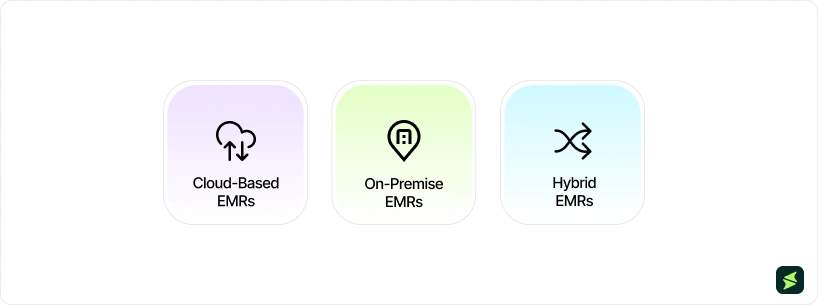
A cloud-based EMR is a software solution designed to store and access patient data from any internet-connected device. Data is stored on remote servers, which are managed by the software vendor. These systems have become increasingly popular among modern healthcare facilities due to their flexibility, cost-effectiveness, and scalability.
PwC's 2025 EMEA Cloud Business Survey found that 94% of organizations plan to expand their cloud architecture in the near term, with 82% actively refining their cloud strategy in response to evolving regulatory and geopolitical pressures.
Best Suited For: Both inpatient and outpatient settings with a reliable internet connection.
Benefits: Subscription-based pricing model, automated software updates, improved patient outcomes with generative AI capabilities, and lower total cost of ownership (TCO).
Drawbacks: Internet connectivity issues and occasional data security concerns.
Popular Vendors: athenahealth, eClinicalWorks EMR, and NetGen EHR software
On-premise EMRs, also referred to as server-based EMRs, follow a traditional approach where the system is stored on a provider’s own servers. This setup gives healthcare facilities complete control over their data and the security measures in place. However, it is more expensive than cloud-based systems and requires more maintenance.
Despite the common belief that on-premise EMR systems are generally more secure, a recent Citrix study found that 31% of respondents experienced the same number of cyberattacks, regardless of whether their data and applications were hosted on-premises or in a hybrid environment.
Best Suited For: Large healthcare facilities with dedicated IT teams.
Benefits: More customization opportunities and improved data security in specific cases.
Drawbacks: Limited remote accessibility, need for dedicated IT resources, high upfront investment, and potential downtime due to server maintenance.
Popular Vendors: Epic software and Cerner EMR. (Both systems also offer cloud-based solutions.)
Hybrid EMRs combine the functionalities of both cloud-based and on-premise deployment models. This approach allows healthcare organizations to deploy their software in the cloud while maintaining the customization and control typically associated with a traditional server-based system.
Best Suited For: Larger healthcare systems that require the combined benefits of both on-premise and cloud-based models.
Benefits: Flexible workflows, private data storage, and improved patient information security.
Drawbacks: Require more maintenance, higher overall costs, and potential implementation challenges.
Popular Vendors: Many large EHR vendors offer custom-configured hybrid solutions for their users.
The right type of EMR software for your practice depends on the specific needs of your medical specialty, as specialty practices have diverse workflows (e.g., cardiologists versus dermatologists), varying regulatory compliance requirements, and specialized billing needs. Understanding the different types of medical practices is essential before selecting an EMR that truly aligns with your clinical and operational requirements.
In this section, we will explore the various types of EMR systems designed to address these unique requirements.

General EMRs are designed following a one-size-fits-all approach, where the system covers the basic features required by various medical specialties. However, these solutions may lack specialized features tailored for individual medical fields and might not be sufficient to deliver the modern standard of healthcare in those settings.
Best Suited For: General practitioners and internal medicine physicians who treat common medical conditions and perform routine exams.
Benefits: Cost-effective, less complex, and easier to implement and manage.
Drawbacks: Limited customization options and lack of support for specialty-specific workflows.
Popular Vendors: Allscripts EMR, Practice Fusion EHR software, and Epic software. (These vendors also offer specialty-specific solutions.)
Specialty-Specific EMR systems are designed to meet the unique needs of a particular medical specialty, such as optometry, dermatology, or rheumatology. These systems offer customizable templates, workflows, and functionalities that align with the specific clinical and administrative processes of the specialty.
Many EMR vendors are now focusing on developing specialty-specific solutions. For Example athenahealth announced the launch of its suite of specialty-specific solutions. The offerings, including athenaOne for Women’s Health and athenaOne for Urgent Care, are designed to address the unique needs of specialty practices.
Best Suited For: Practices or clinics that focus on a single medical specialty and require software tailored to their specific workflows.
Benefits: Specialty-specific workflows, fully adaptable to individual needs, fewer documentation errors.
Drawbacks: Higher cost compared to general EMRs and potential for integration challenges with other systems.
Popular Vendors: ModMed EMR (for dermatology), SimplePractice (for mental health), and ChiroSuite (for chiropractic).
Multi-Specialty EMR software are designed to support multiple medical specialties through a centralized interface. These systems offer customizable templates, modules, and workflows to build a cohesive environment between multiple specialties within the same organization.
Best Suited For: Hospitals or group practices that serve multiple specialties and need a unified system.
Benefits: Coordinated care among various specialties, improved interoperability within the organization, and greater data management efficiency.
Drawbacks: Customization challenges and higher maintenance costs.
Popular Vendors: Epic, Cerner, and Tebra.
EMR systems are also categorized by the type of healthcare setting they are built for. According to statistics from the Office of the National Coordinator for Health Information Technology (ONC), over 78% of office-based physicians and 96% of hospitals in the U.S. have adopted EMR systems.
Here are two primary types of electronic health record systems that address the unique requirements of these healthcare settings:

Ambulatory EMRs are specifically designed for outpatient care settings, such as clinics and independent physician practices. These systems are often used within a single department and have less requirement for interoperability. Ambulatory EMR systems support various workflows, such as patient visits, appointment scheduling, prescription management, and billing.
Here are a few key takeaways from the 2025 KLAS ambulatory EHR/PM mindshare report:
Best Suited For: Physician offices, specialty centers, ambulatory surgery centers, and dialysis centers.
Benefits: Quick access to critical patient data, improved clinical decision-making, and better treatment outcomes.
Drawbacks: Limited functionality for inpatient settings.
Popular Vendors: athenahealth, eClinicalWorks, and NextGen.
Acute care EMRs are designed for use in hospital settings, where they manage high volumes of patient data and complex workflows associated with inpatient care. These systems support critical functions such as real-time patient monitoring, medication administration, and coordination of care across multiple departments.
To further illustrate the current trends in acute care EMRs, we can look at some recent data. According to the key findings of the KLAS 2025 U.S. acute care EHR market share report:
Best Suited For: Hospitals, emergency departments, and other inpatient care facilities.
Benefits: Comprehensive patient data management and integration with other hospital systems such as imaging and lab systems.
Drawbacks: Often more expensive than ambulatory EHRs.
Popular Vendors: Cerner, Epic, and Meditech.
Inpatient EMRs are built for healthcare settings where patients are admitted for extended stays, requiring continuous documentation, care coordination, and clinical oversight across multiple departments. These systems manage core functions such as admission and discharge workflows, nursing assessments, medication management, and real-time updates to patient records.
Best Suited For: Hospitals, Intensive Care Units (ICUs), surgical centers, and other inpatient settings.
Benefits: Quick access to patient information, simplified care coordination across long-term stays, and improved patient satisfaction.
Drawbacks: Implementation complexity can disrupt workflows.
Popular Vendors: Meditech, Oracle Health, and Epic

The size of your practice matters when choosing a medical software system. Some EMR software are designed to meet the unique needs of solo practitioner clinics, while others are designed specifically for large healthcare organizations.
Small practice EMR systems are designed to address the needs of solo practitioners and small medical offices. These systems typically offer features that facilitate efficient patient management, billing, and documentation within a compact and user-friendly interface. They are tailored to support the essential functions of smaller practices without the complexity and cost associated with larger systems.
Many small practice EMR vendors are integrating AI-powered capabilities to enhance their functionality. For example, NextGen Healthcare has recently expanded its AI-driven ambient listening technology and introduced NextGen Office Ambient Assist, a solution specifically designed for small practices.
Mid-size EMR systems are primarily built for group practices, multi-specialty clinics, and regional healthcare organizations. These systems balance advanced clinical functionality with manageable implementation requirements, supporting features like multi-provider scheduling, integrated billing, and cross-department documentation within a single platform.
As mid-size practices face growing administrative and regulatory demands, vendors in this space are increasingly embedding automation and analytics tools to reduce manual workload. For example, athenahealth has expanded its reporting and revenue cycle automation capabilities to better serve mid-size ambulatory and multi-specialty groups.
Best Suited For: Group practices, multi-specialty clinics, and regional health networks.
Benefits: Stronger scalability and feature depth without the overhead of enterprise systems
Drawbacks: May require dedicated administrative or IT resources to manage configuration, integrations, and ongoing system updates.
Popular Vendors: NextGen, athenahealth, and Praxis EMR
Enterprise medical software are designed for large healthcare organizations and integrated health networks, where they manage extensive patient data and complex workflows across multiple departments and facilities. These systems offer robust features for comprehensive data integration, real-time decision support, and enhanced interoperability.
The KLAS 2025 U.S. Acute Care EHR Market Share report also highlights that Epic's strong product and vendor relationships drove its largest net market share gain on record, with health systems continuing to drive most purchase decisions in 2024.
Best Suited For: Large hospitals and multi-specialty healthcare facilities.
Benefits: High scalability, advanced decision support tools, and enhanced interoperability.
Drawbacks: High implementation and maintenance costs.
Popular Vendors: Epic, Oracle Health, and Meditech.
The technology and integration capabilities of an EMR system are important factors to consider when selecting the right software for your practice. Listed below are the two main types of EMR software in this category that you need to keep in mind:

Standalone EMR systems are designed to function independently without needing integration with other software. These systems are typically focused on specific tasks, such as patient record management, and are ideal for practices that require straightforward, all-in-one solutions.
Best Suited For: Small practices or clinics that need basic EMR functionality without complex integration.
Benefits: Easy to implement, user-friendly, and cost-effective for basic needs.
Drawbacks: Limited advanced features, lack of integration with other systems, and may require manual data entry.
Popular Vendors: SimplePractice, DrChrono EHR, and Amazing Charts EMR Software.
Integrated EMR Systems are designed to connect seamlessly with other software solutions, such as practice management systems, billing software, and laboratory information systems. These systems are ideal for organizations that require a comprehensive solution to manage multiple aspects of patient care and business operations.
Best Suited For: Large practices, multi-specialty clinics, and hospitals that need a comprehensive, integrated solution.
Benefits: Optimized operational efficiency and better coordination of care.
Drawbacks: Higher implementation costs, complex setup, and may require extensive staff training.
Popular Vendors: eClinicalWorks, Cerner, and athenahealth.
The benefits of EMR software extend to providers, patients, and the overall healthcare system. These technology-driven tools are designed to streamline day-to-day workflows, improve patient outcomes, and reduce errors.
EMRs offer quick and easy access to a patient’s medical history, which enhances the accuracy of diagnoses and treatments. Healthcare providers can use these solutions to share patient information with other providers and remove the gaps in the patient care process.
Moreover, EMR systems help users comply with regulatory requirements and ensure patient information security. These EHR benefits collectively empower providers to deliver high-quality patient care.
Now that you understand how to identify the right type of EMR system for your clinical setting and practice needs, it is time to consider how to learn EMR systems and choose the best solution from the various options available within that category.
To help you with this decision, we have compiled a list of must-have EMR features that any reliable software should support.
Basic Features:
Advanced Features:

EMR software has become a cornerstone of modern healthcare delivery in the US, with healthcare IT spending reaching $206.47 billion in 2025. Whether you are a solo healthcare provider or part of a larger healthcare organization, selecting the best EMR software for your facility is important for optimizing patient care, improving operational efficiency, and maintaining regulatory compliance.
Before evaluating any vendor, assess where your current processes are breaking down. The goal is to choose an EMR that solves operational problems.
Here’s how to gather honest input from your team:
Your team structure determines which features your staff will use. Match your evaluation criteria to your practice size.
For small practices (1–5 providers):
For mid-size practices (6–20 providers):
For large or multi-location practices (20+ providers):
The subscription price is the starting point of what you will spend. Calculate the full cost of ownership before committing to any platform.
Line items to account for:
EMR systems store sensitive patient health information, which makes compliance a baseline requirement. Verify these independently rather than taking vendor assurances at face value.
Essential compliance checks:
Before making a final decision, put the system through its paces using your practice's actual workflows.
Many practices focus heavily on features during evaluation and underestimate what it actually takes to go live. Data migration, staff training, workflow reconfiguration, and the productivity dip that follows a cutover are real costs that don't appear in any vendor proposal. Practices that skip a structured implementation plan often find themselves mid-rollout with no clear path forward.
Before committing to any platform:
When evaluating various types of EMR systems in healthcare, consider the following questions to ensure the solution meets your practice's specific needs and objectives:
You should also schedule product demos to assess the system's functionality firsthand and ensure it aligns with your practice’s requirements before making a final decision.
Still unsure which type of EMR is the right fit for your practice? Call us at (661) 384-7070, and our team will provide personalized guidance to help you navigate your options. We'll take into account your clinical setting, practice size, workflow requirements, and budget to help you build a shortlist worth evaluating. So, you go into vendor conversations with a clearer picture of what you need.